Table of Contents
ToggleWhen your Shark vacuum suddenly stops picking up debris or the brush roll quits spinning mid-clean, it’s frustrating. But before you haul it to the curb or call customer service, there’s a simple fix most owners overlook: the brush roll reset button. This small thermal cutoff switch protects your vacuum’s motor from overheating, and it trips more often than you’d think, usually from tangled hair, blockages, or running the vacuum too long without a break. Resetting it takes about thirty seconds and solves the problem in most cases. This guide walks through exactly where to find the button on different Shark models, how to reset it correctly, and what to do when the reset doesn’t work.
Key Takeaways
- The Shark vacuum brush roll reset button is a thermal overload protector that trips when the motor overheats due to clogs, hair tangles, or excessive use—and resetting it usually takes just 30 seconds.
- Common culprits for reset button trips include hair and fiber wrap around the brush roll, clogged filters or hoses, worn belts, and foreign objects jamming the brush roll.
- To reset your Shark vacuum brush roll, unplug the unit, let it cool for 10-15 minutes, clear all blockages and tangles, press the reset button firmly, and test the brush roll.
- If the reset button doesn’t work after troubleshooting, the issue may be a permanently failed thermal fuse, broken belt, or burned-out motor—situations that may require professional repair or replacement.
- Monthly brush roll cleaning, regular filter maintenance, and quarterly belt inspections prevent the reset button from tripping and extend your vacuum’s lifespan.
What Is the Shark Vacuum Brush Roll Reset Button?
The brush roll reset button is a built-in thermal overload protector, a safety mechanism that cuts power to the brush roll motor when it detects excessive heat or electrical draw. Think of it like a circuit breaker for your vacuum’s spinning brush.
When the motor works harder than normal (due to a clog, jammed brush, or hair wrap), it draws more current and heats up. The reset button pops, stopping the brush roll before the motor burns out. It’s a protective feature, not a design flaw.
Most Shark uprights and lift-away models include this button. You won’t find it on all stick vacuums or handheld-only units, since those use different motor protection systems. If your model has a motorized floor nozzle, there’s a good chance it has a reset button somewhere on the body.
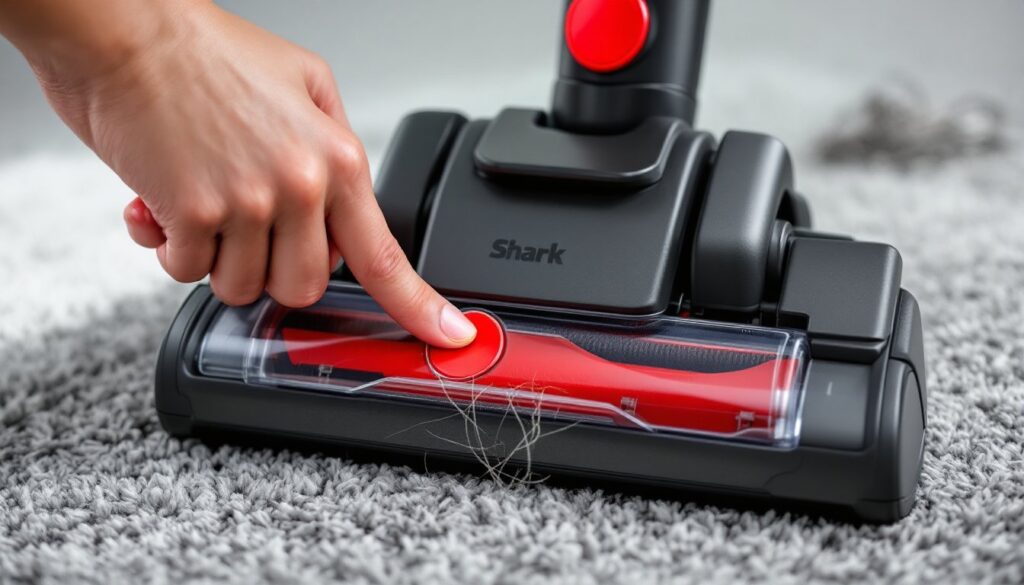
The button itself is usually red or black, small (about the size of a pencil eraser), and slightly recessed. When tripped, it may pop out visibly or simply require a firm press to click back into place.
Where to Locate the Reset Button on Your Shark Vacuum Model
Location varies by model, but Shark keeps it fairly consistent across product lines. Here’s where to look:
Shark Navigator and Rotator Series (uprights and lift-aways):
- Check the side of the floor nozzle, near where the brush roll housing meets the main body. Look for a small circular button, often red, on the left or right edge.
- On some models, it’s on the top surface of the nozzle, just behind the clear window where you see the brush roll.
Shark Vertex and APEX Models:
- The button is typically on the underside of the nozzle, near the brush roll access panel. You may need to tip the vacuum back or lay it flat to see it.
- A few models place it on the rear of the nozzle, close to the hinge point if it’s a lift-away design.
Shark ION Robot and Cordless Stick Models:
- Not all cordless or robotic models include a manual reset button. Many use auto-resetting thermal fuses or app-based alerts. Check your user manual if you can’t find a physical button.
If you’re still stuck, grab your model number (printed on a label under the dust cup or on the body near the power cord) and search “[model number] reset button location” or check tested vacuum maintenance guides for visual diagrams.
Step-by-Step: How to Reset Your Shark Vacuum Brush Roll
Resetting the brush roll is straightforward, but you need to clear the cause of the trip first. Skipping that step means the button will just pop again.
1. Power Off and Unplug
Turn the vacuum off and unplug it from the wall. Never work on a vacuum while it’s connected to power, even if the switch is off.
2. Let It Cool (10-15 Minutes)
If the motor tripped due to overheating, the button won’t reset until the motor cools. Wait at least 10 minutes. Touch the nozzle or motor housing, if it’s warm, give it more time.
3. Clear the Brush Roll and Check for Blockages
- Flip the vacuum over or detach the nozzle.
- Open the brush roll access panel (usually secured by two tabs or a rotating latch).
- Pull out any hair, string, carpet fibers, or debris wrapped around the brush roll. Use scissors to cut through thick tangles, but don’t cut the bristles.
- Check the air pathways and hose for clogs. A blockage anywhere in the system can cause the motor to strain.
4. Press the Reset Button
Locate the reset button and press it firmly until you hear or feel a click. It should sit flush with the housing. If it doesn’t click, the motor may still be too hot.
5. Reassemble and Test
Snap the brush roll cover back on, plug in the vacuum, and turn it on. The brush roll should spin freely. If it doesn’t, or if the button pops immediately, move to the troubleshooting section below.
Common Reasons Your Shark Brush Roll Needs Resetting
Understanding why the button trips helps you prevent repeat resets.
Hair and Fiber Wrap
This is the #1 culprit. Pet hair, human hair, and carpet fibers wind tightly around the brush roll and axle, creating friction. The motor works harder to spin the roll, heats up, and trips the reset.
Clogged Hose or Filter
When airflow is restricted, the vacuum compensates by drawing more power. A clogged HEPA filter or blocked hose forces the motor into overdrive. Regular home maintenance practices recommend checking filters monthly.
Worn or Damaged Belt
The belt connects the motor to the brush roll. If it’s stretched, cracked, or slipping, the motor spins harder to turn the roll. You’ll often smell burning rubber before the reset trips. Shark belts cost about $8–12 and take five minutes to replace.
Overuse Without Breaks
Vacuuming for extended periods (more than 30–40 minutes straight) on thick carpet or high-pile rugs can overheat the motor. Let the vacuum rest for 10 minutes between long sessions.
Foreign Objects Jamming the Roll
Screws, coins, small toys, or chunks of debris can wedge between the brush roll and housing, stopping rotation instantly. The motor tries to keep spinning, trips the reset, and may burn out if you don’t clear the jam.
Troubleshooting When the Reset Button Doesn’t Work
If pressing the reset button doesn’t restore brush roll function, dig deeper.
Button Won’t Click or Stay In
The thermal fuse inside may have failed permanently. This happens after multiple overheating events. Replacement thermal switches are available (around $10–15), but you’ll need to disassemble the nozzle and solder the new part in place. If you’re not comfortable with that, contact Shark support or a vacuum repair shop.
Brush Roll Spins Briefly, Then Stops
This usually means the root cause wasn’t addressed. Recheck for:
- Hair tangles deep inside the brush roll endcaps
- Debris in the belt pathway
- A worn belt that’s slipping under load
Motor Hums But Brush Roll Doesn’t Turn
The belt is likely broken or off-track. Remove the brush roll and inspect the belt. If it’s snapped, order a replacement specific to your Shark model (belt part numbers vary). Installation typically involves removing two screws, lifting out the old belt, looping the new one around the motor shaft and brush roll, and snapping everything back.
No Power to the Nozzle at All
Check the electrical contacts where the nozzle connects to the main body (on lift-away models). Dirt or corrosion can interrupt the connection. Wipe the contacts with a dry cloth or a bit of rubbing alcohol on a cotton swab.
If none of these steps work, the brush roll motor itself may have burned out. Motors aren’t typically user-replaceable. Many DIY vacuum repair guides suggest weighing the cost of professional repair against replacing the unit, especially if the vacuum is more than five years old.
Preventive Maintenance Tips to Avoid Future Brush Roll Issues
A little routine care keeps the reset button from tripping in the first place.
Clean the Brush Roll Monthly
Even if the vacuum seems fine, remove the brush roll cover and clear any buildup. Pet owners or anyone with long hair should do this every two weeks.
Wash or Replace Filters Regularly
Shark recommends rinsing foam and felt filters monthly and replacing HEPA filters every 6–12 months. Dirty filters choke airflow and strain the motor. Let filters air-dry completely (24 hours) before reinstalling.
Inspect the Belt Every Three Months
Pop off the brush roll cover and check the belt for cracks, stretching, or fraying. Replace it if it looks worn. Belts are cheap insurance against motor burnout.
Empty the Dust Cup Before It’s Full
Don’t wait until the cup is packed. Empty it when debris reaches the max fill line. Overfilling reduces suction and forces the motor to work harder.
Avoid Vacuuming Large Debris
Shark vacuums are designed for dust, dirt, and small particles, not chunks of drywall, kitty litter, or gravel. Pick up larger items by hand to prevent jams.
Store in a Dry, Moderate Environment
Extreme heat or humidity can warp plastic components and degrade belts. Don’t leave the vacuum in a hot garage or damp basement.
Conclusion
The brush roll reset button is a straightforward fix for one of the most common Shark vacuum problems. Find the button, let the motor cool, clear out tangles and clogs, and press to reset. If that doesn’t solve it, inspect the belt, check for jams, and verify airflow isn’t blocked. Regular cleaning and filter maintenance prevent most trips in the first place. When the reset button fails to restore function after troubleshooting, it’s time to evaluate whether repair or replacement makes more sense.